- 目录
- 最终效果图:
- 一.
<meta>标签 - 二. 外部样式表
- 三. RSS阅读器
- 四. div和span
- 五. id 选择器
- 六. hreflang
- 七. margin:0 auto;属性
- 八. 位置不是绝对的
- HTML代码
- CSS 代码如下:
学完了HTML+CSS, HTML5和CSS3还没有学, 不过貌似没有学习的必要, 就目前而言. 毕竟我不是做前端的呀. 正好想起来, 之前下过Debian博客单个网页的前端源代码, 是使用HTML+CSS写的, 比较简单, 正好拿过来练手.
目录
- 效果图
- 博文
- HTML代码
- CSS代码
最终效果图:
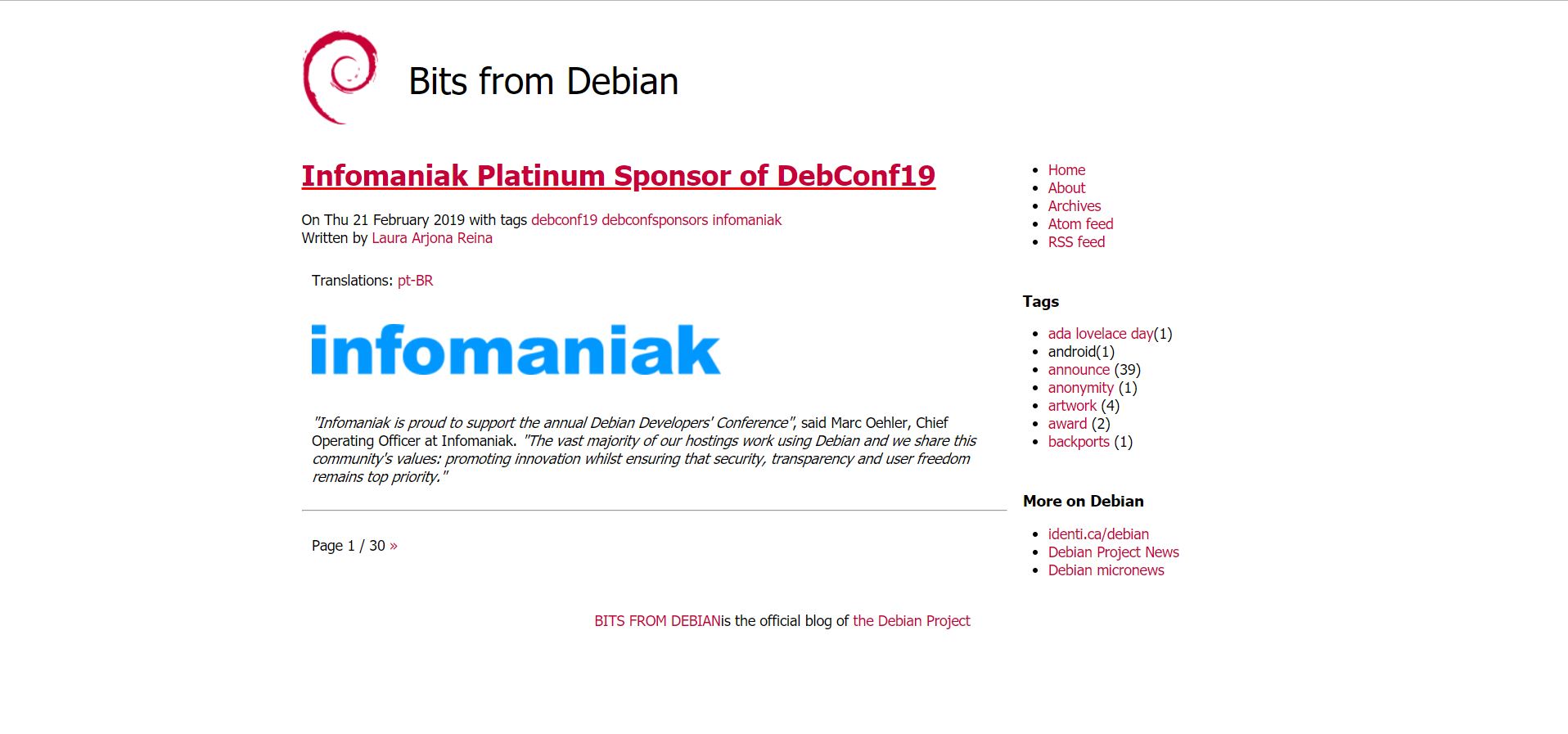
一. <meta> 标签
(1) http-equiv属性
当服务器向浏览器发送文档时,会先发送许多名称/值对。虽然有些服务器会发送许多这种名称/值对,但是所有服务器都至少要发送一个:content-type:text/html。这将告诉浏览器准备接受一个 HTML 文档。
(2) HTML 与 XHTML 之间的差异
- 在 HTML 中,
<meta>标签没有结束标签。 - 在 XHTML 中,
<meta>标签必须被正确地关闭。
(3) name="viewpoint"
手机浏览器是把页面放在一个虚拟的“窗口”(viewport)中,通常这个虚拟的“窗口”(viewport)比屏幕宽,这样就不用把每个网页挤到很小的窗口中, 用户可以通过平移和缩放来看网页的不同部分。移动版的 Safari 浏览器最新引进了 viewport 这个 meta tag, 让网页开发者来控制 viewport 的大小和缩放,其他手机浏览器也基本支持。
<meta name=”viewport” content=”width=device-width, initial-scale=1, maximum-scale=1″>
- width: 控制viewport大小, device-width为设备的宽度(单位为缩放为100%时的CSS的像素)
- initial-scale:初始缩放比例,也即是当页面第一次 load 的时候缩放比例。
- maximum-scale:允许用户缩放到的最大比例。
- minimum-scale:允许用户缩放到的最小比例。
- user-scalable:用户是否可以手动缩放
二. 外部样式表
<link href="test_files/style.css" rel="stylesheet">
- link标签是用于当前文档引用外部文档的
- rel=”stylesheet”是告诉浏览器link进来的是个样式表文件
三. RSS阅读器
参考 RSS阅读器是一种软件或是说一个程序,这种软件可以自由读取RSS和Atom两种规范格式的文档
    <!-- Feed autodiscovery -->
    <link href="https://bits.debian.org/feeds/atom.xml" type="application/atom+xml" rel="alternate" title="Bits from Debian Atom Feed">
    <link href="https://bits.debian.org/feeds/feed.rss" type="application/rss+xml" rel="alternate" title="Bits from Debian RSS Feed">
这行代码的作用就是告诉访问该页面的客户端程序(浏览器,RSS Reader,或者是RSS聚合器)该页面提供Atom Feed,RSS Feed以及它们的地址
四. div和span
(1) HTML <div> 元素
HTML <div> 元素是块级元素,它是可用于组合其他 HTML 元素的容器。
<div> 元素没有特定的含义。
如果与 CSS 一同使用,<div> 元素可用于对大的内容块设置样式属性。
(2) HTML <span> 元素
HTML <span> 元素是内联元素,可用作文本的容器。
<span> 元素也没有特定的含义。
当与 CSS 一同使用时,<span> 元素可用于为部分文本设置样式属性。
五. id 选择器
HTML元素以id属性来设置id选择器,CSS 中 id 选择器以 “#” 来定义。
以下的样式规则应用于元素属性 id=”para1”:
#para1
{
    text-align:center;
    color:red;
}
在HTML元素中设置CSS样式, 可以在元素中设置”id”或者”class”选择器
六. hreflang
<a> 标签的 hreflang 属性用于指定被链接文档的语言。
hreflang=”zh” 表明指向的链接是中文网站:
<a href="http://www.w3school.com.cn" hreflang="zh">W3School</a>
七. margin:0 auto;属性
参考 margin:0 auto;的意思就是:上下边界为0,左右根据宽度自适应.其实就是水平居中的意思,
八. 位置不是绝对的
中间写CSS时,把content的width手误写大了, 导致右边的链接栏跑到下面去了, 可见位置并不是绝对的, 而是受多方面因素的影响
HTML代码
<!DOCTYPE html>  <!--声明这是HTML5文件, 以区分HTML4等版本 -->
<html lang="en"><head> <!--声明html文档所用语言-->
    <meta http-equiv="content-type" content="text/html"; charset=UTF-8"> <!--<meta> 标签提供元数据, 不会显示在页面上, 用于规定页面的描述,关键词, 文档的作者,最后修改时间等-->
    <meata charset="utf-8"></meata> <!--规定 HTML 文档的字符编码 -->
    <title>Bits fro Debian - Blog from the Debian Project </title> <!--<title>标签定义文档的标题,内容不在页面中显示-->
        <meta name="description" content=""> <!--描述-->
        <meta name="author" content="The Debian Project"> <!--作者-->
        <meta name="viewport" content="width-device-width,initial-scale=1.0"> <!--宽度为设备的宽度, 初始缩放比例为1.0-->

        <!--中间都是一些 我觉得没用的代码-->

        <!--CSS样式,外部样式表,引用外部文档,并且告诉浏览器引入的是样式表文件-->
        <link href="test_files/style.css" rel="stylesheet">

        <!--告诉客户端(浏览器,rss reader) atom feed和 rss feed的地址-->
        <link href="https://bits.debian.org/feeds/atom/xml" type="application/atom+xml" rel="alternate" title="Bits from Debian Atom Feed">
        <link href="https://bits.debian.org/feeds/feed.rss" type="application/rss+xml" rel="alternate" title="Bits from Debian RSS Feed">

        <!--头部到此结束-->
</head>

<!--文本可见内容开始-->
<body>
<!--整个可见内容的样式都引用该id选择器-->
<div id="wrapper">
    <div id="header">
        <!--给图片添加链接;给图片引用类 但是貌似没有找到这个类;
        alt属性,如果无法显示图像则显示该段文字;style定义图片的位置,定义上边距;text-align 属性定义对齐方式-->
        <a href="https://bits.debian.org/"><img class="logo"  src="test_files/openlogo-nd-75.png" alt="Bits from Debian" style="margin-top:20px;"align="left"></a>
        <p>Bits from Debian</p>
    </div>
    <!--hr在文档中画一条横线, 但是引用的css样式是display:none;所以没有显示-->
    <hr class="nocss">
    <!--通过该id选择器确定主要内容的位置为左-->
    <div id="content">

    <!--通过class类选择器确定文章的样式-->
    <div class="article">
        <!--通过class类选择器确定标题的样式-->
        <div class="content-title">
            <!--给该标题添加链接, 并为一级标题-->
            <a href="https://bits.debian.org/2019/02/infomaniak-platinum-debconf19.html"><h1>Infomaniak Platinum Sponsor of DebConf19</h1></a>
            On Thu 21 February 2019
            with tags <a href="https://bits.debian.org/tag/debconf19.html">debconf19</a> <a href="https://bits.debian.org/tag/debconf.html">debconf</a><a href="https://bits.debian.org/tag/sponsors.html">sponsors</a> <a href="https://bits.debian.org/tag/infomaniak.html">infomaniak</a> <br>
            Written by <a class="url fn" href="https://bits.debian.org/author/laura-arjona-reina.html"> Laura Arjona Reina</a> <br>

            <p>
                Translations:
                <!--hreflang属性表明指向的链接网站语言为pt-->
                <a href="https://bits.debian.org/2019/02/infomaniak-platinum-debconf19-pt-BR.html" hreflang="pt-BR">pt-BR</a>
            </p>
        </div>
        <!--以上为该篇博客的简介,以下为该篇博文的部分内容-->
        <div><p><a href="https://www.infomanik.com/"><img alt="infomaniaklogo" src="test_files/infomaniak.png"></a></p>
            <!--标签p里面是一个段落;<em>表强调-->
            <p><em>"Infomaniak is proud to support the annual Debian Developers' Conference"</em>,
                said Marc Oehler, Chief Operating Officer at Infomaniak. <em>"The vast majority
                of our hostings work using Debian and we share this community's values:
                promoting innovation whilst ensuring that security,
                transparency and user freedom remains top priority."</em></p>
        </div>
        <hr>
    </div>
    <!--这个类没有找到....;另外,在不少博客中可以看到采用的是另一种翻页方式-->
    <p class="paginator">
        Page 1 / 30
            <a href="https://https://bits.debian.org/index2.html">»</a>
    </p>
 </div>

<!--上面是一整个大块,下面是另一个大块;这个html文档分为两个大块;下面的大块主要是页面右侧的一系列链接-->


<!--用改id选择器确定右侧链接栏的背景以及位置-->
<div id="rightcolumn">

    <hr class="nocss">
    <!--确定home等主要几个链接的样式;padding为内边距,这是简写,上下内边距为8px,左右内边距是0px;-->
    <div class="lateral" style="padding:8px 0;">
        <!--无序列表,类选择器,没找到-->
        <ul class="nav-list">
            <li><a href="https://bits.debian.org/">Home</a></li>

            <li><a href="https://bits.debian.org/pages/about.html">About</a></li>

            <li><a href="https://bits.debian.org/archives.html">Archives</a></li>
            <!--atom feed 和rss feed链接-->
            <!--rel属性指明 该链接指向的文档是什么类型, alternate表示"文档的替代版本(比如打印页,翻译或镜像)-->
            <li><a href="https://bits.debian.org/feeds/atom.xml" rel="alternate">Atom feed</a></li>
            <li><a href="https://bits.debian.org/feeds/feed.rss" rel="alternate">RSS feed</a></li>
            </ul>
    </div>

    <hr class="nocss">
    <div class="lateral" style="padding: 8px 0;">
    <h1>Tags</h1>
        <!---一系列的无序列表-->
        <ul class="nav-list">
            <li><a href="https://bits.debian.org/tag/ada-lovelace-day.html">ada lovelace day</a>(1)</li>
            <li><a hred="https://bits.debian.org/tag/android.html">android</a>(1)</li>
            <li><a href="https://bits.debian.org/tag/announce.html">announce</a> (39)</li>
            <li><a href="https://bits.debian.org/tag/anonymity.html">anonymity</a> (1)</li>
            <li><a href="https://bits.debian.org/tag/artwork.html">artwork</a> (4)</li>
            <li><a href="https://bits.debian.org/tag/award.html">award</a> (2)</li>
            <li><a href="https://bits.debian.org/tag/backports.html">backports</a> (1)</li>
        </ul>
 </div>


 <hr class="nocss">
 <div class="lateral" style="padding: 8px 0;">
<h1>More on Debian</h1>
    <ul class="nav-list">
        <li><a href="https://identi.ca/debian">identi.ca/debian</a></li>
        <li><a href="https://www.debian.org/News/">Debian Project News</a></li>
        <li><a href="https://micronews.debian.org/">Debian micronews</a></li>

    </ul>
</div>
</div>

<hr class="nocss">
<div id="footer">
    <p><a href="https://bits.debian.org/">BITS FROM DEBIAN</a>is the official blog of <a href="https://www.debian.org/">the Debian Project</a></p>
</div>

</div>


</body>


</html>
CSS 代码如下:
/*确定body标签内的样式;font-family属性设置字体,首选字体,预备字体等;font-size设置字体大小像素*/
body {
	font-family: tahoma,verdana,sans-serif;
	font-size:14px;
}


P {
	/*设置填充(内边距)为10px*/
	padding: 10px;
}

/*以下四个的顺序是有要求的,不能乱*/
/*未访问的链接*/
/*text-decoration为文本修饰,如下划线,中划线等*/
/*a:link属于CSS伪类中的anchor伪类*/
a:link {
	color: #C70038;
	text-decoration: none;
}

/*鼠标点击时*/
a:active {
	color: #000000;
	text-decoration: none;
}

/*已访问链接*/
a:visited {
	color: #C70038;
	text-decoration:none;
}

/*鼠标移动到链接上时*/
a:hover {
	color: #FF0000;
	text-decoration:underline;
}

/*id 选择器*/
#wrapper {
	/*margin:0 auto;表达的意思就是水平居中的意思*/
	margin: 0 auto;
}

#header {
	/*元素向左浮动*/
	float: left;
	/*设置元素高度,CSS框模型*/
	height: 125px;
}

/*原注释的意思是这个id选择器的作用是让"Bits from Debian"更靠近中间*/
/*该段代码对选用了header选择器的div元素里面的p标签起作用*/
#header p {
	font-size: 36px;
	/*margin为外边距,左边的外边距为2.5cm*/
	margin-left: 2.5cm;
}

#content {
	/*元素向左浮动*/
	float: left;
}

#rightcolumn {
	background: #fff;
	float: left;
}

#footer {
	/*设置元素高度,CSS框模型*/
	height: 30px;
	/*居中*/
	text-align:center;
	/*clear 属性指定元素两侧不能出现浮动元素。避免元素浮动后周围 的元素会重新排列*/
	clear: both;
}

/*class 选择器*/
.article h1 {
	color: #C70038;
}

.lateral h1{
	/*字体大小,单纯的字体大小*/
	font-size: 15px;
	padding-left: 1em;
	padding-top: 0em;
}

.nocss {
	display: none;
}

/*原注释:防止在小窗口中水平滚动*/
/*div#content我通过类比推测时选用了content这个id选择器的div元素指定样式*/
/*因为两个地方所用的样式时一样的, 所以使用了分组选择器,用","隔开*/
div#content, img {
	max-width: 100%;
}
div.hightlight {
	overflow-x: auto;
}
/*原注释: 防止在太大的视图中横向“滚动”*/
/*媒体类型:电脑显示器; 以及在宽度大于等于940px的媒体上,使用以下样式*/
@media screen and (min-width: 940px) {
	#wrapper {
		width: 940px;
	}
	#header {
		width: 940px;
	}
	#content{
		/*之前手误把这里写成了940px,导致内容宽度太大,右侧链接栏跑到下面去了,所以,一个区域的位置的影响因素的多方面的.*/
		width: 690px;
	}
	#rightcolumn {
		width: 250px;
	}
	#footer {
		width: 940px;
	}
}